GT4T Suite4.91
Publisher Description
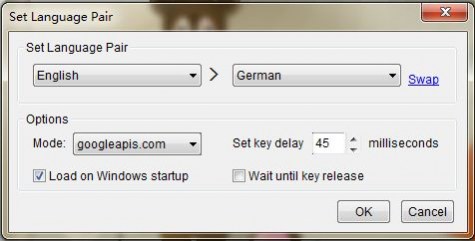
GT4T Suite integrates Google Translate and Google Dictionary into all Windows applications. It supports many language pairs (over 50 languages). It brings the most useful online resources to your fingertip to ensure smoother translation process with less interruption and can remarkably increase your productivity.
GT4T is small, clean, easy, unobtrusive. It works in all Windows applications (anywhere you can type text).
If you use Tageditor, Trados Workbench, Trados 2009, Wordfast, SDLX, memoQ, GT4T provides extra hotkeys that automatically translate current or next segments.
About GT4T Suite
This Office Suites & Tools program is available in English. It was last updated on 29 September, 2026. GT4T Suite is compatible with the following operating systems: Windows.
The company that develops GT4T Suite is Dallas Cao. The latest version released by its developer is 4.91. This version was rated by 3 users of our site and has an average rating of 3.7.
The download we have available for GT4T Suite has a file size of 1.0 MB. Just click the green Download button above to start the downloading process. The program is listed on our website since 2017-06-20 and was downloaded 362 times. We have already checked if the download link is safe, however for your own protection we recommend that you scan the downloaded software with your antivirus. Your antivirus may detect the GT4T Suite as malware if the download link is broken.
How to install GT4T Suite on your Windows device:
- Click on the Download button on our website. This will start the download from the website of the developer.
- Once the GT4T Suite is downloaded click on it to start the setup process (assuming you are on a desktop computer).
- When the installation is finished you should be able to see and run the program.
Program Details
System requirements
Download information
Pricing
Version History
version 4.91
posted on 2017-06-20
4.91.170620: Fix issues with Dictionary feature
version 4.90
posted on 2017-06-19
4.90.170619: Many fixes
version 4.32
posted on 2016-10-10
4.32.161010: Fixed: Thai year problem.
version 3.40
posted on 2011-04-19
3-29-2011 3.38 1)Bug fixed: “Bad request” error; 2)CTRL+ALT+J and CTRL+ALT+K now support memoQ.
7-26-2010 3.37 Bug fixed: Some special characters shown as unicode codes.
